The AI workspace for Company Secretaries that runs your research.
Niyora brings frontier AI to Indian Company Secretaries - so the research, drafting, filings, deadlines, registers and billing that eat your week take minutes instead. One platform that reasons over Indian corporate law and your own client portfolio, built to take the busywork off your plate.
No credit card required · Set up in minutes · Cancel anytime
What actually changes for your practice
Answers in seconds, not evenings
Ask about the law or about your own clients and get an answer grounded in the actual statute - or in your firm’s records - with the sections cited, so you can trust it and move on.
Never miss a filing again
Every ROC, MCA, GST and income-tax deadline auto-populates for each client, so a missed due date - and its penalty - stops being a risk.
Registers that keep themselves
Switch on statutory registers for a client and all 14 stay current and inspection-ready, drawn from your own records - no more parallel spreadsheets.
Every client, always in the loop
Clients follow their incorporation and compliance live - fewer status calls, and a practice that looks effortlessly on top of things.
Grounded in the statutes you work with every day
Why now
The rules change weekly. Your capacity shouldn’t be the bottleneck.
AI has stopped being optional for a modern CS practice. It is fast becoming the line between firms that scale and firms that stall.
Regulation never stops
MCA, SEBI, RBI and GST change the rules constantly. Tracking every amendment by hand does not scale - and a single missed update can cost a client a penalty.
Clients now expect instant answers
The firm that replies in minutes wins the relationship. Speed has quietly become the difference between a practice that grows and one that just keeps up.
AI that reasons, not just fills forms
Most “AI” tools only autofill a form. Niyora reasons over the statute and your own client data - so the same team drafts, researches and files for twice the clients.
The firms adopting AI today will quietly out-serve those that wait - handling more clients, answering faster, and missing less. Niyora is how you get there without hiring a tech team.
The platform
Everything your practice runs on - in one place.
Not a single trick. A complete, connected workspace for research, drafting, compliance and running the firm - each part designed around how CS firms actually work.
Document Drafter
Draft board resolutions, minutes, agreements, notices and letters from a guided form - Niyora produces a clean, properly structured document grounded in the right Companies Act sections, ready to export as a polished .docx or PDF, on your firm’s or the client’s letterhead. What used to take an hour takes a couple of minutes.
Document DrafterAsk Niyora
One assistant for two questions: the law - cited from the actual statute text - and your own portfolio, e.g. “which clients have an overdue ADT-1?”. Read-only, firm-scoped, streamed live.
Ask NiyoraMCA Filer extension
Our Chrome extension reads the live MCA V3 form, AI-maps your client data onto it and fills it - inside your own MCA session. No stored portal passwords, no per-form templates.
MCA Filer extensionDue Diligence
Upload the documents; Niyora checks each one against the rules its document type declares - nine shipped types plus your firm’s own - and grades every rule with a sentence of evidence. Scope you write yourself, plus a chat across the whole run.
Due DiligenceStatutory Registers
All 14 Companies Act registers kept current with a maker-checker sign-off - form-prescribed PDF/Word, CSV, version freeze and audit trail.
Statutory RegistersCompliance Calendar
ROC, MCA, GST and income-tax deadlines auto-populate per client - scoped to the work you were actually engaged for, assignable to a team member, and subscribable straight into Outlook or Google Calendar.
Compliance CalendarMeetings
Board / AGM / EGM: agenda, notice, quorum checks, minutes.
58 workflow playbooks
Allotments, transfers, closures, KYC - guided end to end.
Incorporation
Quotation to COI and beyond, in one thread.
DSC & DIN registry
KYC and certificate expiry per director, across every board.
Mobile app
Ask by voice, log time, approve, run engagements - with push.
Your own Drive
Files auto-mirror to your Google Drive or OneDrive.
Roles & delegation
Scoped access per member; delegate a subset, time-bound.
Client CRM & health
Contacts, interactions, lead source, a 0–100 health score.
Tasks & Time
Kanban board, time logging and your own leave policy.
GST billing
Invoices, quotes, credit notes and debit notes - GST-ready.
Analytics
Revenue, team, engagement and compliance drill-downs.
Equity & Cap Table
Live cap table, shares and ESOP views.
Document Library
Every draft for every client, searchable.
Morning brief
A daily digest of your firm - shaped the way you ask for it.
See it for real
This is Niyora. Not a mockup of it.
Every screen below is the live product, running on a fully-populated CS firm’s real workload - not a designer’s impression of one.
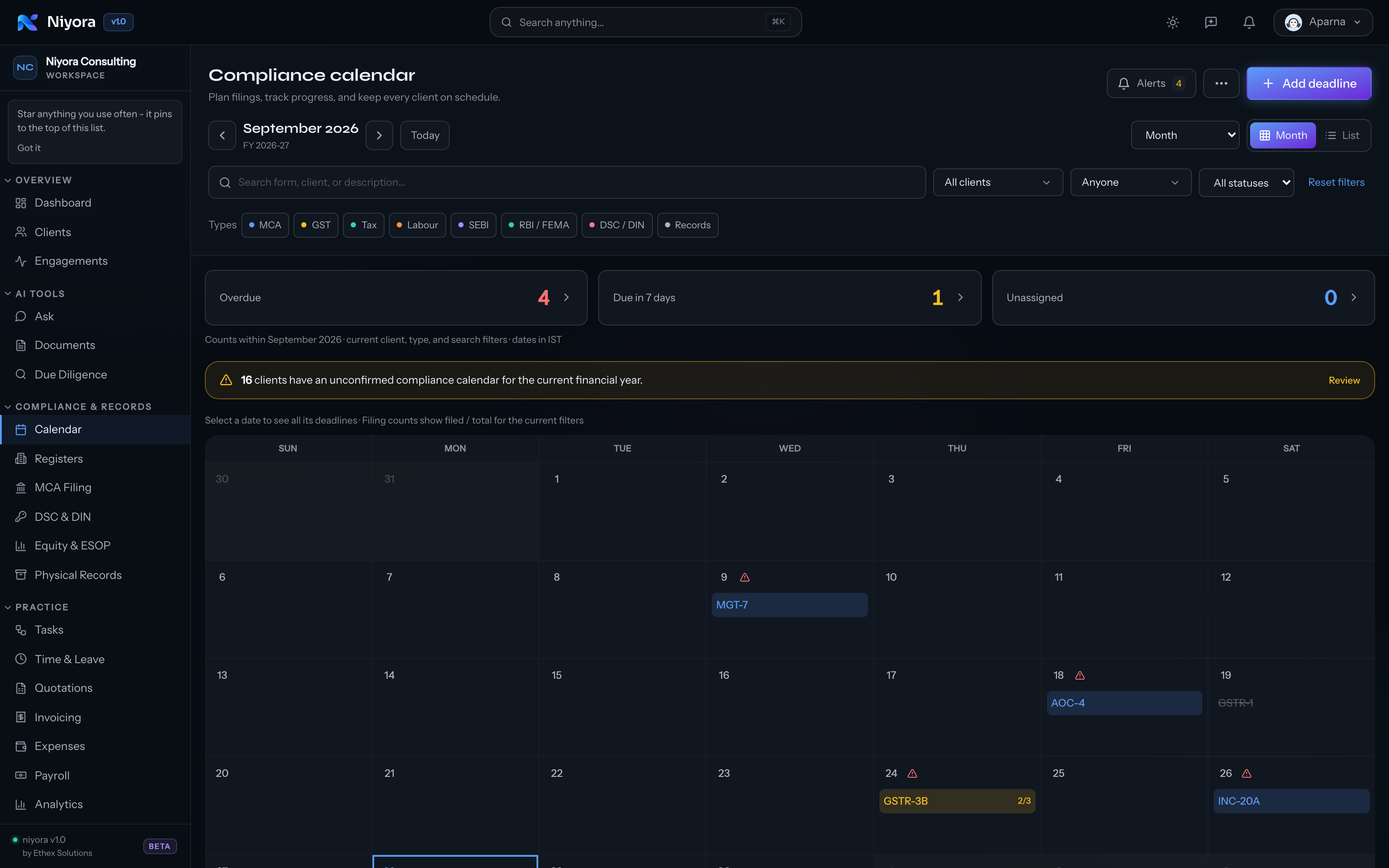
Every filing, every client, one month view - overdue and due-soon counted for you.
Running the firm
A practice is more than the filings it makes.
The billing, the recoveries, the hours nobody wrote down and your own ICSI obligations decide whether the firm is profitable. Niyora treats them as first-class work, not an afterthought bolted on beside the compliance tools.
Billing that matches how India actually pays
Most practice software assumes a bill is either paid or not. Yours never is - clients pay in parts, deduct TDS, and sit on a retainer.
- Retainers raise their own draft bills, every month or quarter
- Part payments, and the TDS your client deducted, recorded against the bill
- Credit notes, write-offs and debit notes for pure-agent recoveries
- A plain-English “details of charges” annexure, so nobody asks what the fee covered
The revenue you were quietly losing
An hour never logged is an hour never billed; a courier bill never recorded is money gone. Niyora closes both gaps by default.
- Logged hours flow straight into the invoice, at each member’s rate
- Out-of-pocket costs get approved, then recovered on the next bill - exactly once
- Work done outside the retainer surfaces as unbilled, before it is forgotten
- WIP, realisation and per-client margin, so you can see which clients actually pay
Time captured where the work happens
Nobody fills a timesheet at the ROC. So say one sentence into your phone and it becomes a timesheet entry you confirm later at your desk.
- Speak or type it - the AI reads out the client, the work and the duration
- A day clock you can pause, that wraps itself up if you forget
- Backdating inside a window you set, and an admin unlock beyond it
- Leave types, quotas and balances defined by your firm, not by us
Chasing money, without the awkward call
Receivables age quietly until someone remembers to look. Niyora looks every day and does the first few nudges for you.
- Ageing by client, in buckets, with the oldest debt surfaced
- A statement of account you can email or download as a PDF
- A polite reminder ladder that runs on its own - pausable per client
- Everything it sends lands on that client’s interaction timeline
Your firm’s own compliance, not just your clients’
You track every client’s obligations meticulously and keep your own in a spreadsheet. Those belong on the same calendar.
- CPE hours logged against the cycle they were actually earned in
- ICSI membership and Certificate of Practice renewals, well before they lapse
- An engagement-letter register - drafted, sent, signed, and the signed copy filed
- All of it appears alongside your clients’ deadlines, not in a separate silo
DSC and DIN, across every directorship
One director sits on six boards. Their DIR-3 KYC and DSC expiry are one fact that has to reach all six.
- A firm-wide director registry, fed automatically as you add clients
- DIR-3 KYC and DSC expiry deadlines synced to every company they serve on
- A record of which tokens your firm holds, and where they are kept
- Bulk import and bulk edit, with duplicate DINs detected and merged
Most firms discover the leak only at year end. Here it is visible on a Tuesday - while there is still time to bill it.
The CS ⇄ client handoff
One flow, shared between you and every client.
Niyora isn’t only for the firm. The whole engagement - from quotation to incorporation and beyond - runs as a single thread you and your client move through together, with nothing lost to email.
You send the quotation
A branded, GST-compliant quote goes out through a secure link - nothing for the client to install and no account to create.
Client submits details & director KYC
The client fills in company details and completes KYC for every director in a clean, guided flow at their own pace.
Name proposals, reviewed together
The client proposes company names; you review, refine and approve - the whole exchange in one place, not over email.
Client pays securely
Payment and proof are captured in the portal, and the engagement advances to filing on its own.
Signing packet prepared & e-signed
You generate the signing packet; the client reviews and signs it right from the portal - no printing, no courier.
You file with the MCA
Name reservation, SPICe+ and the Certificate of Incorporation are captured and tracked - with the MCA Filer extension autofilling the forms.
Bank account & INC-22
You draft the bank-opening steps for the client to confirm, and they upload INC-22 proofs - utility bill, NOC and geo-tagged photos.
Registers & everything after
You maintain the statutory registers; the client inspects them read-only, exchanges messages and is notified at every milestone.
The result: your client always knows exactly where things stand, and the “any update?” calls quietly disappear.
And the clients who won’t log in
Some clients will only ever reply to an email. That’s fine.
Mark a client email-only and Niyora stops asking them to log in anywhere. The same requests go out as ordinary emails, and what they send back is captured for you - so a portal is never the price of working with you.
01
The ask goes out as an email
Approve this draft, upload this document, answer these questions - as a normal email, with a secure link for anyone who prefers to click.
02
Their reply comes back in
A one-line “looks good” or an attachment sent straight back from Outlook is read, attached to the right request, and put in front of you.
03
You confirm - nothing auto-applies
A client’s reply is recorded, never acted on by itself. You review it and confirm, so an approval is always something a person granted.
Built for CS professionals, not IT teams
Up and running in minutes - not weeks.
No installation, no migration project, no manual to memorise. If you can use email, you can use Niyora.
Create your firm
Sign up with your firm name and admin email. No installation, no IT, no configuration to learn.
Add your clients
Add clients one at a time, import a spreadsheet, or drop in a folder of mixed documents and let AI sort and extract them for you.
Start working
Ask questions, draft documents, run due diligence and share portals - productive from the very first day.
Trustworthy AI
Answers grounded in the actual statute - not guesswork.
Generic chatbots invent section numbers. Niyora retrieves from the real text of Indian law and shows its sources, so you stay in control of every answer you rely on.
Grounded in real statute
Answers are retrieved from the actual text of Indian law, not improvised from memory - so you can check the source.
Reads your data, safely
Questions about your clients query your own firm’s records read-only, scoped to your firm and your permissions - never another firm’s.
Every answer cites its source
Each response carries the sections and documents it drew from, so verification takes seconds, not hours.
Powered by Anthropic’s Claude models, with retrieval over a knowledge base that refreshes from official portals.
Security & privacy
Your clients trust you with everything. We take that seriously.
A CS firm holds incorporation papers, cap tables, PAN and DIN details for dozens of companies - under your name, and your liability. Niyora is built so that data stays scoped, reviewable, untouched by us, and yours to take away.
We never hold your MCA password
The MCA Filer works inside the session you are already signed into, on your own machine. There is no stored portal credential for anyone to lose.
Everyone sees only their own book
Access is scoped to the clients a member actually works on. Roles are yours to rename and re-permission, and access can be delegated as a time-bound subset.
A second pair of eyes where it counts
A statutory register is only official once an authorised person verifies it. The same optional sign-off covers workflow steps, expenses and reopened timesheets.
Know where your team signs in from
Optionally record every sign-in location, alert on one outside your offices, or require an admin to approve it - with a full sign-in history either way.
Your documents stay yours
Files are held privately and shared only through expiring links - and they mirror continuously into your firm’s own Google Drive or OneDrive, so you are never locked in.
Consent and audit, by default
DPDP-aligned consent is captured, and material actions leave an audit trail - so when a client or a regulator asks what happened, there is an answer.
Who can see what
Three parties. One honest answer for each.
Most vendors bury this in a policy. Here it is up front - including the column about us.
Your firm
You decide, member by member
Can see
- Everything you are entitled to, scoped to your own book of clients
- Roles you name and permission yourself
- Access delegated to a colleague as a time-bound subset
Cannot
- Another firm’s data - ever, under any role
- A colleague’s clients, unless your role or manager reaches them
Your client
Only their own company
Can see
- Their own documents, invoices and registers - read-only
- The progress of work you are doing for them
- Messages and requests addressed to them
Cannot
- Any other client of your firm
- Your internal notes, time logs, costs or margins
- Editing a statutory register - that stays with you
Niyora
Deliberately, almost nothing
Can see
- Your firm’s name, plan and number of seats
- How much AI you used - token counts for billing, not the prompts
- The wording of legal-research questions, kept to improve retrieval quality
- Whatever you choose to attach to a bug report
Cannot
- Open a client record, document or draft - no admin screen exists that can
- Sign in as you or any of your members - the product has no such feature
- Use your data to train any AI model
Never used to train AI
Your prompts and documents go to our AI providers only to answer the request in front of them. Under their API terms, none of it trains a model - yours or anyone else’s.
Hosted in India
The application and your database run in the Mumbai region. Where an AI provider processes outside India, we say so plainly in our Privacy Policy rather than burying it.
Encrypted, and kept apart
Everything travels over TLS. Documents sit in private storage reachable only through short-lived links, connected-account tokens are AES-256-GCM encrypted, and passwords are hashed.
Yours to take with you
Files mirror into your own Google Drive or OneDrive as you work, so you always hold a copy we do not control. Ask us to delete your firm and every record of it goes.
Under the DPDP Act you are the data fiduciary for your clients’ information and Niyora is only your processor. The detail - every sub-processor, retention period and your rights - is in our Privacy Policy, Data Processing Terms and AI Use & Disclaimer.
How we treat you
We move at the speed of your practice.
Software is only as good as the team behind it. We made giving feedback effortless - and acting on it fast - a core part of the product, not an afterthought.
Feedback from any screen
See something off? Tell us in one tap - type it, or just speak and we transcribe it automatically. No tickets, no support portal to log into.
Show, don’t describe
Attach a screenshot straight from the app so we see exactly what you see. The page and context come along automatically.
Bugs fixed fast
Reports reach us directly and we triage them quickly. We treat a broken workflow as an emergency, because for your practice it is one.
Shipped continuously
We release improvements on a rolling basis, and the requests we hear most move to the top of the roadmap. Your input shapes what we build next.
Straight answers
The questions firms ask us first.
My clients will never log into a portal. Is this useless for them?
No - a client can be marked email-only, and then every request reaches them as an ordinary email they can simply reply to. Attachments and approvals come back in and land in front of you. The portal is there for clients who want it, never a requirement.
Moving years of client data sounds painful.
There are three ways in and you can mix them. Add a client by hand, import a spreadsheet of companies with their directors and shareholders, or drop in a folder of mixed documents - up to 25 files at a time, for one company or many - and let the AI sort out which papers belong to which company, extract the details, and file them as that client’s knowledge base. You review everything before a single client is created.
How do I know the AI is not making the law up?
Answers about the law are retrieved from the actual statute text we ingest from official portals, and each answer carries the sections it drew from. When something is answered from general knowledge rather than that database, the answer says so plainly instead of sounding equally confident. Questions about your own clients read your firm’s records directly, read-only.
Will the AI file, bill or send anything on its own?
No. AI drafts, extracts and suggests; a person decides. A dictated note is shown back to you before it is saved, a client’s emailed approval is recorded rather than applied, and every filing is submitted by you in your own MCA session.
Can anyone at Niyora see my clients’ data?
Our admin tooling deliberately has no screen that opens a client record, document or draft - it shows firm names, plans, seat counts and AI usage volume, which is what we need to run and bill the service. There is also no “sign in as this firm” feature for anyone to misuse. If we ever need to look at something to fix a problem you have reported, we ask you first.
Is my data used to train AI models?
No. Prompts and documents are sent to our AI providers only to complete the task you asked for, and under their standard API terms that content is not used to train their models. We do not sell or share personal data, and our full sub-processor list is published in our Privacy Policy - we give notice before adding to it.
Where does the data actually live, and what if we leave?
The application and database run in the Mumbai region; where an AI provider processes outside India we disclose it rather than gloss over it. Under Indian data-protection law you are the fiduciary for your clients’ data and we act only as your processor. If you connect a drive, files mirror into your own Google Drive or OneDrive as you go, so you already hold your own copy. On the way out you can export, and a firm can be permanently and irreversibly deleted on request.
We bill on retainers and fixed fees, not hours. Does that work?
Yes. Retainers raise their own drafts on schedule, fixed-fee work is priced from your rate card, and hourly work bills from logged time. TDS deducted by a client, part payments and write-offs all settle against the same bill, so what is outstanding is always the real figure.
What happens when something breaks?
Report it in one tap from any screen - typed, spoken or with a screenshot - and the page you were on comes along automatically. You can then watch its status, alongside a live board of any platform-wide issues we have published.
Give your practice an AI team that never sleeps.
Spend less time on the routine and more on the judgement only you can offer. Start free, set up in minutes, and see what a modern CS practice feels like.
Start your free trialNo credit card required · Set up in minutes